Installationsanleitung
This guide will walk you through installing KSP2 Redux on your system. If you just need the files, head to the download page.
Requirements
Abschnitt betitelt „Requirements“- KSP2 Version: You must have stock KSP2 v0.2.2.0 installed (the latest official version)
- Disk Space: At least 4 GB of free space for new assets
- Operating System: Windows or Linux (x64), or macOS on an Apple Silicon Mac with Rosetta 2
Installation Steps
Abschnitt betitelt „Installation Steps“1. Download the Updater
Abschnitt betitelt „1. Download the Updater“Get the Redux Updater for your system from the download page:
Ksp2Redux-win-x64.exe on Windows, Ksp2Redux-macos-arm64.dmg on macOS or
Ksp2Redux-linux-x64 on Linux. It always has the newest version.
On Linux, mark it executable before running it:
chmod +x Ksp2Redux-linux-x64./Ksp2Redux-linux-x642. Run the Updater
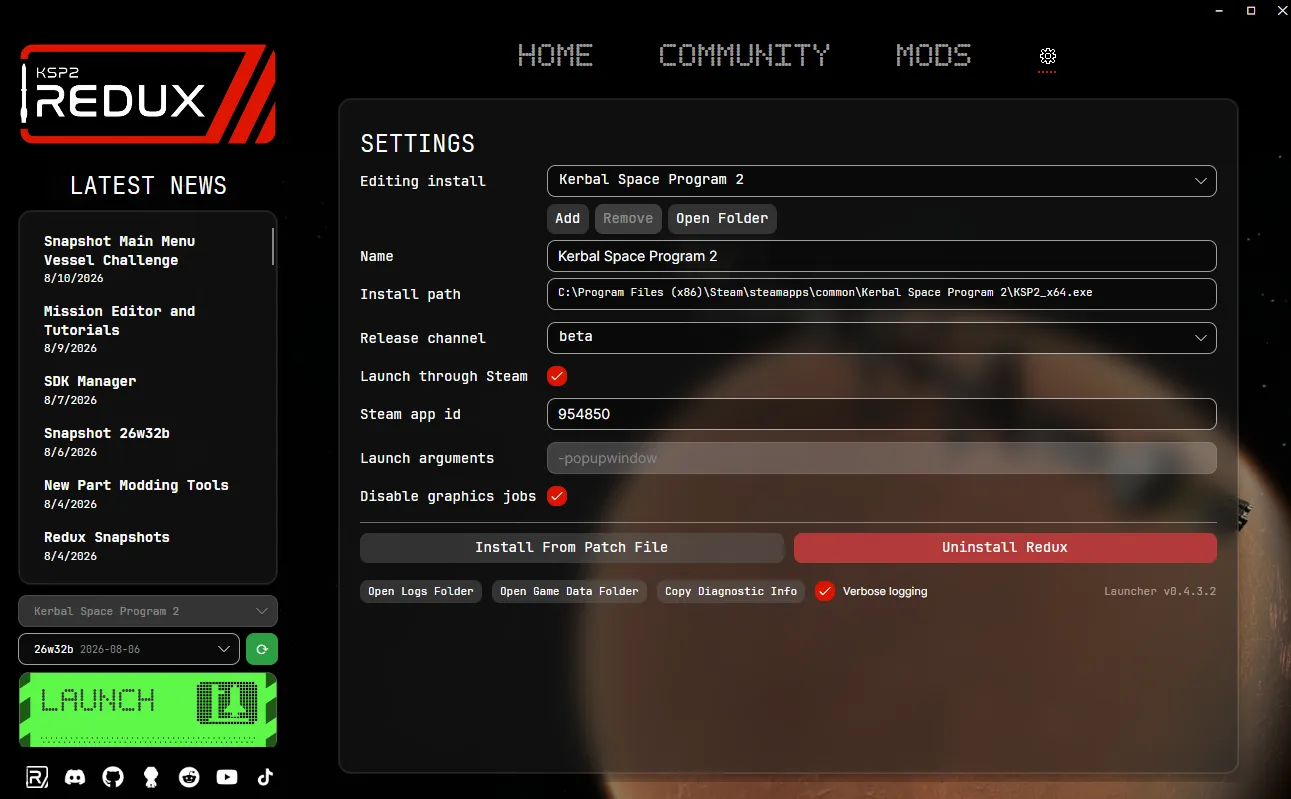
Abschnitt betitelt „2. Run the Updater“- Run the downloaded updater
- Setup your KSP2 Installation in the settings tab (if not auto-detected)
- Make sure the release channel in the settings tab is the one you want (it should be setup by default)
- Go back to the home tab
3. Select Version To Install
Abschnitt betitelt „3. Select Version To Install“In the dropdown on the Home tab, select the version you want to install
4. Install
Abschnitt betitelt „4. Install“- Click Install
- Wait for the progress bar to disappear
5. Launch the Game
Abschnitt betitelt „5. Launch the Game“Press Launch
You can also launch the game through Steam/Epic, or by running KSP2_x64.exe in
the game folder as normal.
Installing From The Command Line
Abschnitt betitelt „Installing From The Command Line“There is also a CLI, redux-launcher-cli, that does the same install as the
Updater window from a terminal. It reads and writes the same config, so you can
move between the two freely. It works on Windows, macOS and Linux and does not
need administrator rights.
Install it with one line, or download redux-cli-x64.exe (Windows),
redux-cli-macos-arm64 (macOS) or redux-cli-x64 (Linux) manually from the
download page. On a Mac, use the same curl line as
on Linux:
irm https://raw.githubusercontent.com/KSP2Redux/Updater/main/scripts/install-cli.ps1 | iexcurl -fsSL https://raw.githubusercontent.com/KSP2Redux/Updater/main/scripts/install-cli.sh | bashThat puts the binary in %LOCALAPPDATA%\Programs\redux-launcher-cli on Windows
or ~/.local/bin on Linux and adds it to your PATH. Running the installer again
upgrades it in place.
Then the usual flow is:
redux-launcher-cli --help # every command, with examplesredux-launcher-cli detect # find KSP2 the way the Updater doesredux-launcher-cli installs add # add the install it found to the configredux-launcher-cli update # install the newest build in its channelredux-launcher-cli launch # start the gameIt keeps itself current with redux-launcher-cli self-update, and version --check reports whether a newer build is published. It also mentions new
releases once a day while you are using it, which --no-update-check turns off.
self-uninstall removes the binary and leaves your config alone.
For scripting, --json writes a document to stdout and everything else to
stderr, exit codes are stable, and completion pwsh|bash prints a shell
completion script.
Verifying Installation
Abschnitt betitelt „Verifying Installation“Once the game launches, you should see Redux-specific features and UI elements. Check the main menu for Redux version information.
Troubleshooting
Abschnitt betitelt „Troubleshooting“Installation Takes Too Long
Abschnitt betitelt „Installation Takes Too Long“- Check that your antivirus isn’t scanning files during installation
- Make sure you have sufficient disk space
Game Won’t Launch
Abschnitt betitelt „Game Won’t Launch“- Ensure your original KSP2 installation is v0.2.2.0
- On Windows, make sure the path to your KSP2 installation is not too long (ideally under 200 characters, Windows can struggle with very long nested paths)
Missing Files Error
Abschnitt betitelt „Missing Files Error“- Verify the integrity of your stock KSP2 installation through Steam/Epic
Uninstalling
Abschnitt betitelt „Uninstalling“To uninstall KSP2 Redux, go to settings in the Updater and press uninstall
Reporting Issues
Abschnitt betitelt „Reporting Issues“If you encounter bugs, please use the in-game bug report feature:
- Press Ctrl+B, or
- Press Escape → Report Redux Bug
This automatically attaches useful information like screenshots, logs, and save files to help us reproduce the issue.
Next Steps
Abschnitt betitelt „Next Steps“- Learn about mod compatibility
- Check out the changelog